


LogPark CIMS brosurunu indirin
Konteyner envanter is akislari, moduller, faturalama, raporlama ve devreye alma secenekleri hakkinda kisa bir genel bakis alin.

Container Inventory Management Software — Powered by LogPark
LogPark is a cloud-based container inventory management software designed for shipping companies, container depots, and leasing operators. It provides complete lifecycle control over 20' and 40' containers — from gate-in acceptance to final disposal, with carrier detection for leased container workflows.
Unlike generic asset management tools, LogPark delivers container-specific workflows with 9 built-in session types. Each session automatically transitions container status, calculates costs, and maintains a full audit trail.
9 Session Types — Full Lifecycle Coverage
- Storage — gate-in acceptance, yard placement, daily storage fees
- Rent — rental agreements with automated billing and return tracking
- Transfer — inter-terminal moves with transport documentation
- Repair — M&R with defect logging, cost tracking, parallel sessions
- Sale — container sales with financial settlement
- Disposal — end-of-life decommissioning and write-off
- Loading / Unloading — cargo handling operations
- Customs Clearance — customs holds and release processing
- Washing — cleaning sessions with service fee calculation
Container Leasing and Tracking Software
Managing a container leasing fleet demands real-time visibility across rental agreements, return schedules, and outstanding invoices. LogPark’s container leasing software module delivers exactly that.
The built-in tariff engine supports multi-dimensional pricing — by service direction (outgoing, incoming, or both), laden/empty status, container size, and free-day thresholds. When a dispatcher creates a rental session, the correct container rental billing rates are applied automatically from the customer’s contract.
How Rental Billing Works
- Contract-linked tariffs — rates auto-applied per customer agreement
- Daily charge calculation with configurable free-day periods
- Invoice generation for incoming and outgoing services
- Settlement tracking — payments matched to invoices in real time
This container rental fleet software also tracks every container’s physical location through linked terminals and stock positions. The result: faster fleet turnover, fewer billing disputes, and a clear rental portfolio view.

Real-Time Container Tracking and Location Management
LogPark provides real-time container tracking through an integrated geolocation module. Every container is mapped to its current terminal, stock position, or transport route.
The hierarchical location model — Contractor → Terminal → Stock — enables precise container availability management across multiple depot sites. Every session records origin and destination, creating a complete movement history.
Dashboard Metrics & Analytics
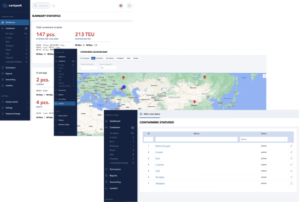
The interactive dashboard displays live statistics at a glance:
- Total fleet size with 20’/40′ and TEU breakdown
- Containers in storage: loaded vs. empty split
- Active rentals, units under repair, assets in transit
- Highcharts graphs — storage and rental trends over 90-day windows
Logistics managers get the data they need for capacity planning and container fleet management decisions without delays.
Shipping Container Management Software — Complete Operations Platform
As a full-featured shipping container management software, LogPark goes beyond basic inventory tracking. The modular architecture includes 15 independent modules — each built with Domain-Driven Design for reliability.
Built-in support for 6 languages (English, German, Spanish, Chinese, Turkish, Russian) makes it ready for multinational logistics operations. Role-based access control ensures each user sees only what they need.
15 Platform Modules
- Container — fleet registry, statuses, session management
- Contractor — customers, partners, shipping lines, contracts
- Finance — tariffs, invoicing, settlements, accounting
- Report — custom reports with Excel/PDF export
- Map — geolocation tracking, terminal maps
- Notification — alerts for overdue, returns, events
- Messenger — internal communication between users
- Reference — container types, sizes, statuses catalogs
- Dynamic Fields — custom data fields without code changes
- Plus 6 more for users, settings, sync, audit, and security
Dynamic Field System
The dynamic field system lets administrators create unlimited custom data fields per session type — without any code changes. Adapt the platform to regional requirements, specialized workflows, or unique container attributes your business needs.
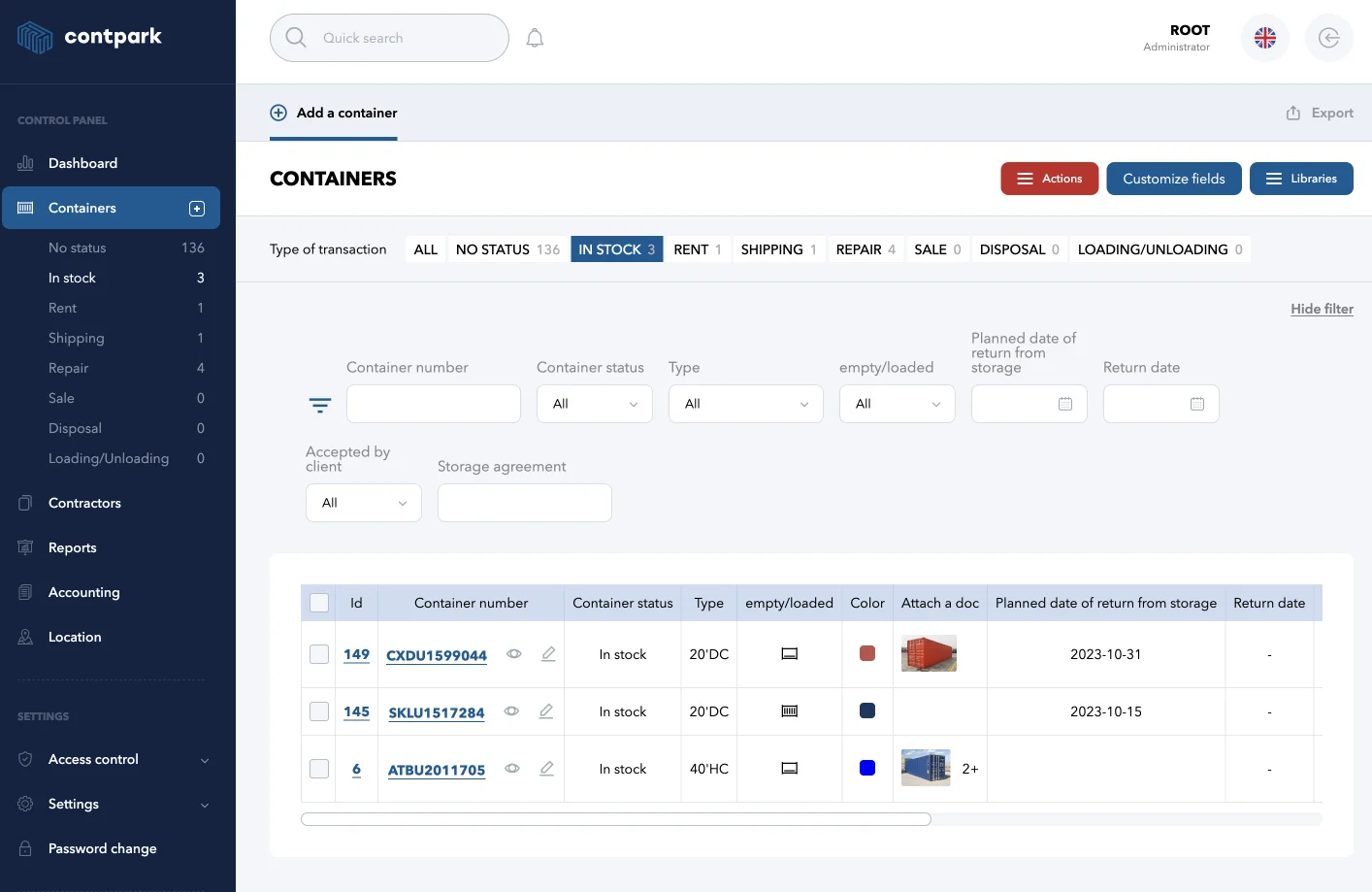
Container inventory — full fleet overview
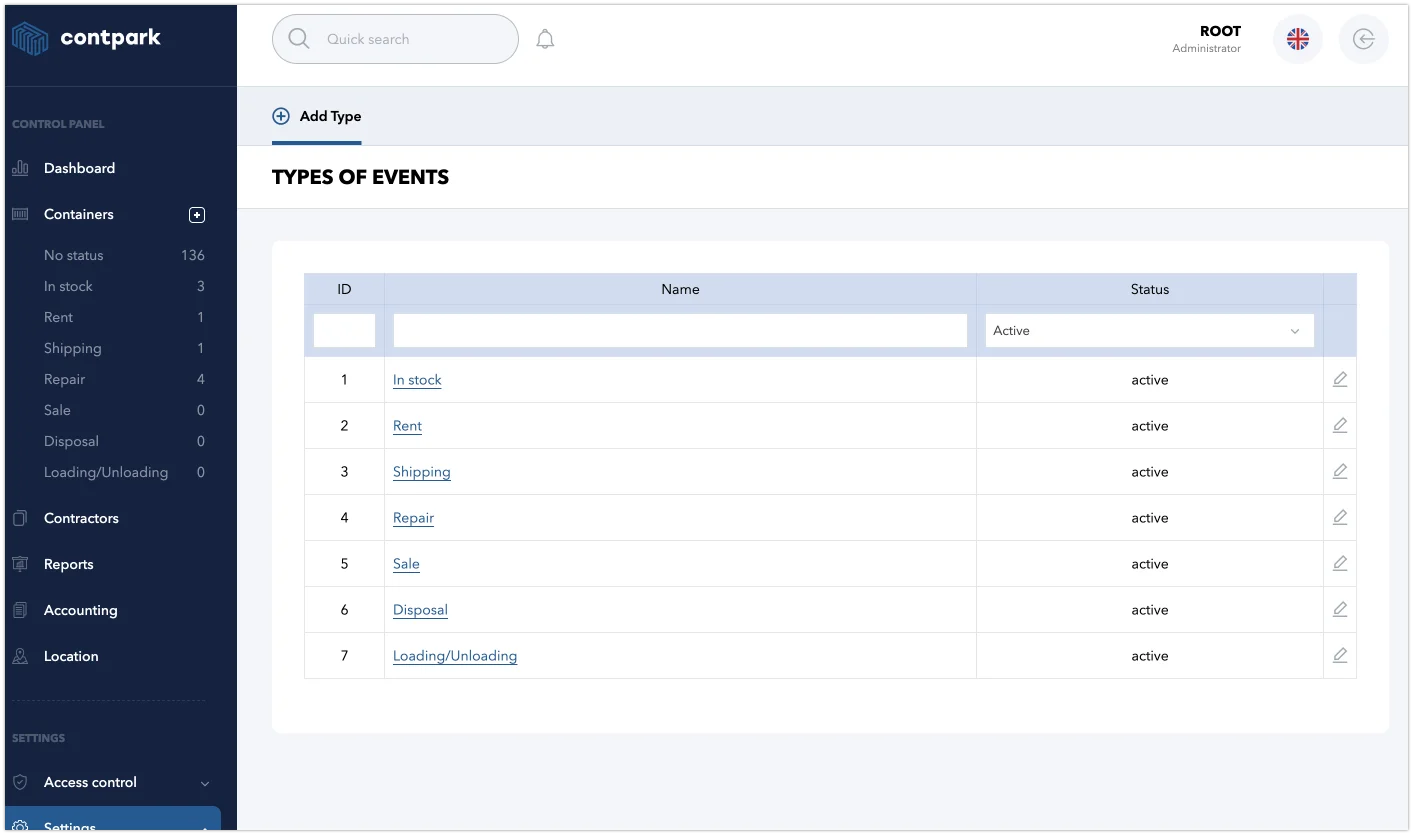
References for container types and sizes
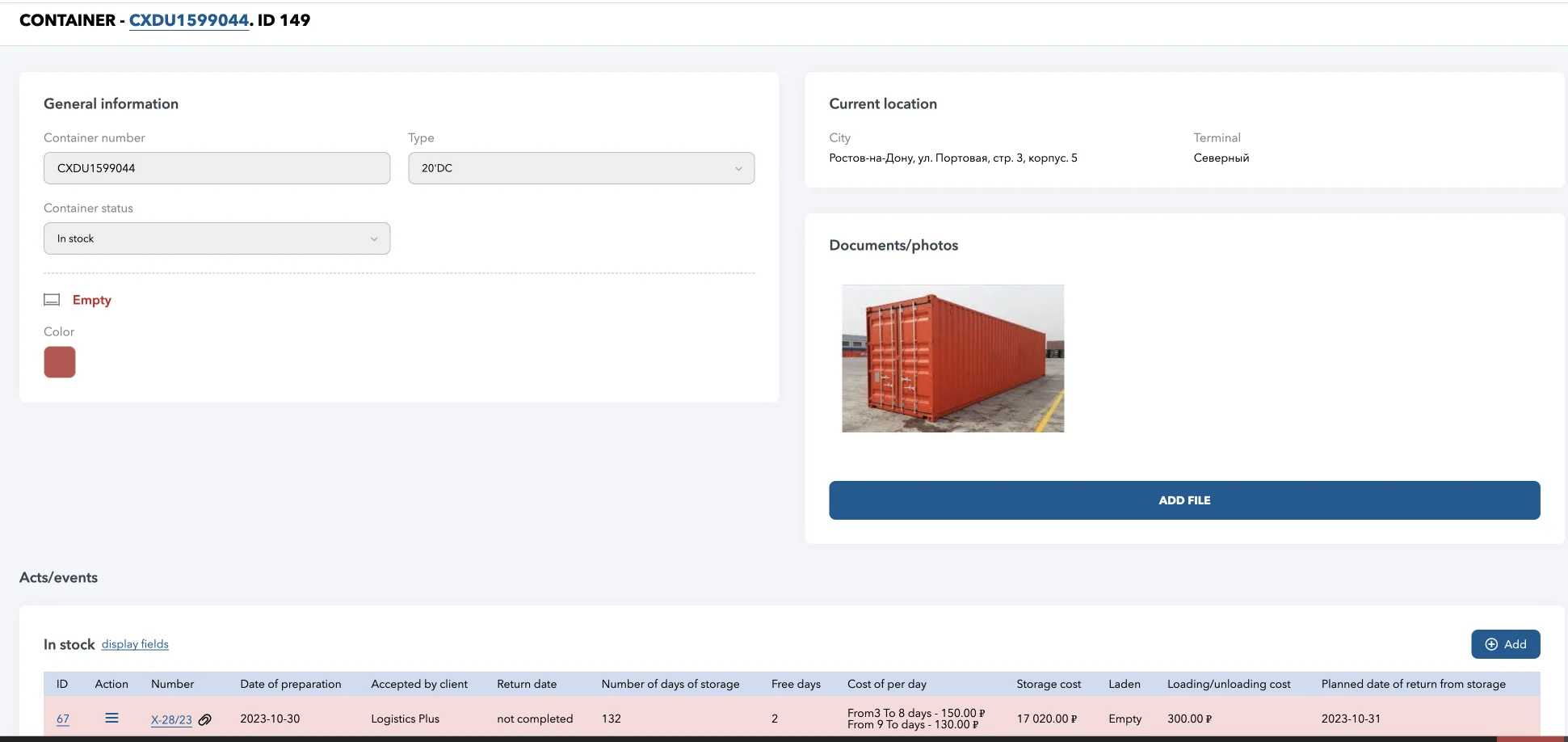
Container descriptions with history of all operations
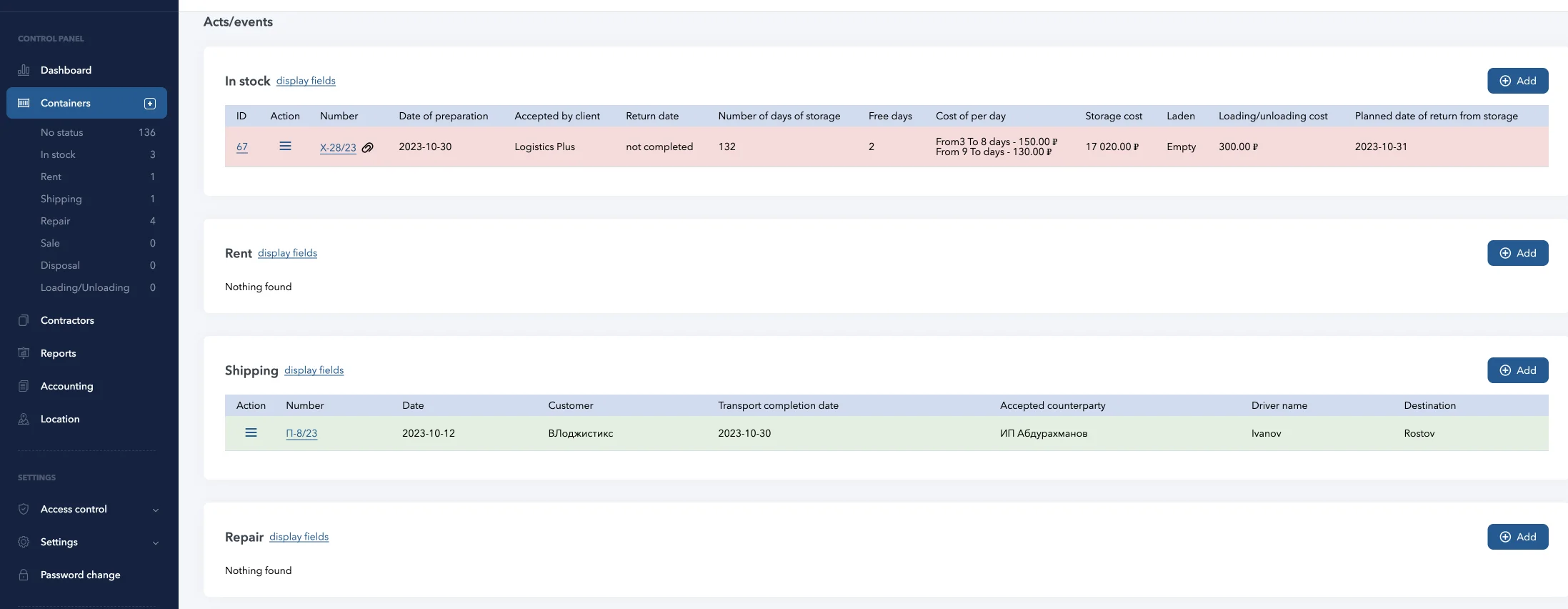
Creating new events and closing completed events
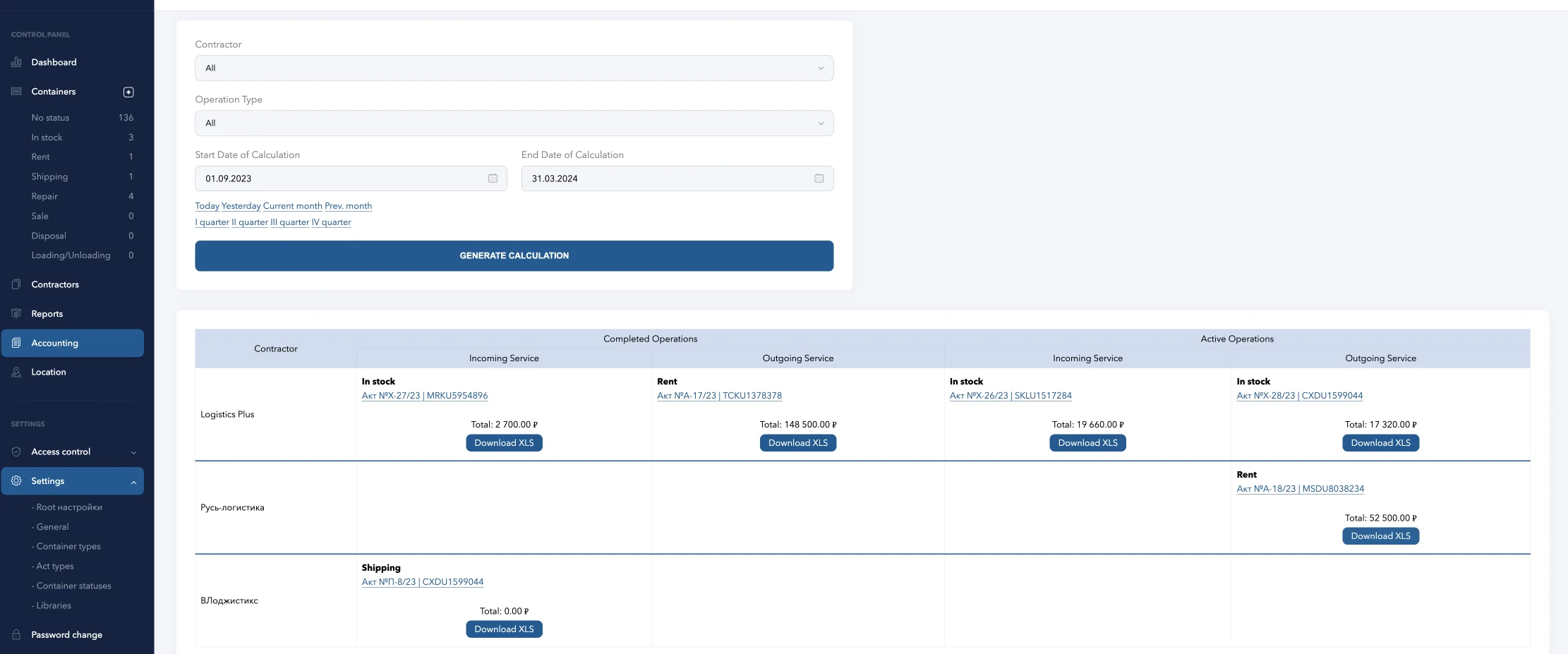
Accounting and costing at set rates
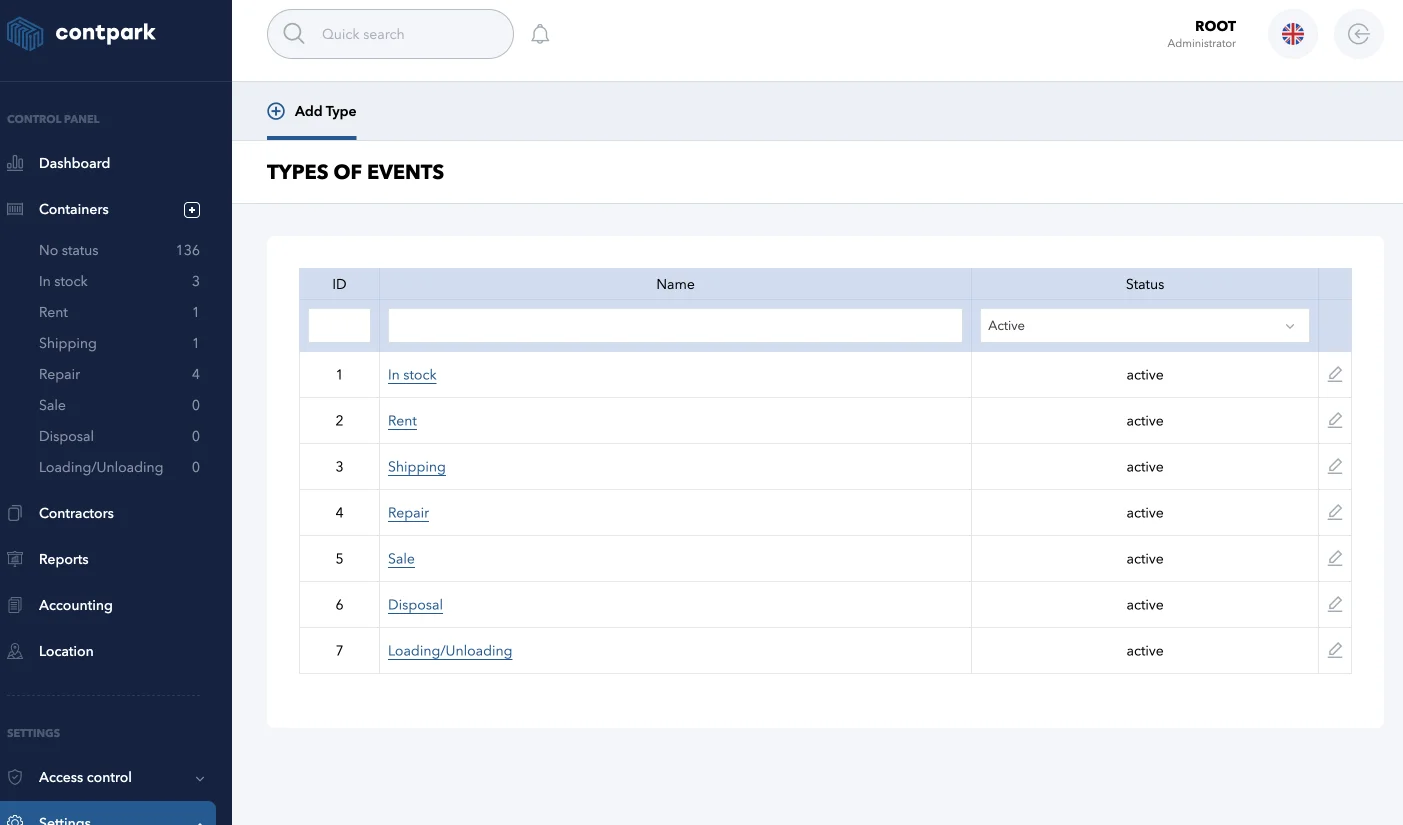
Operation type directory
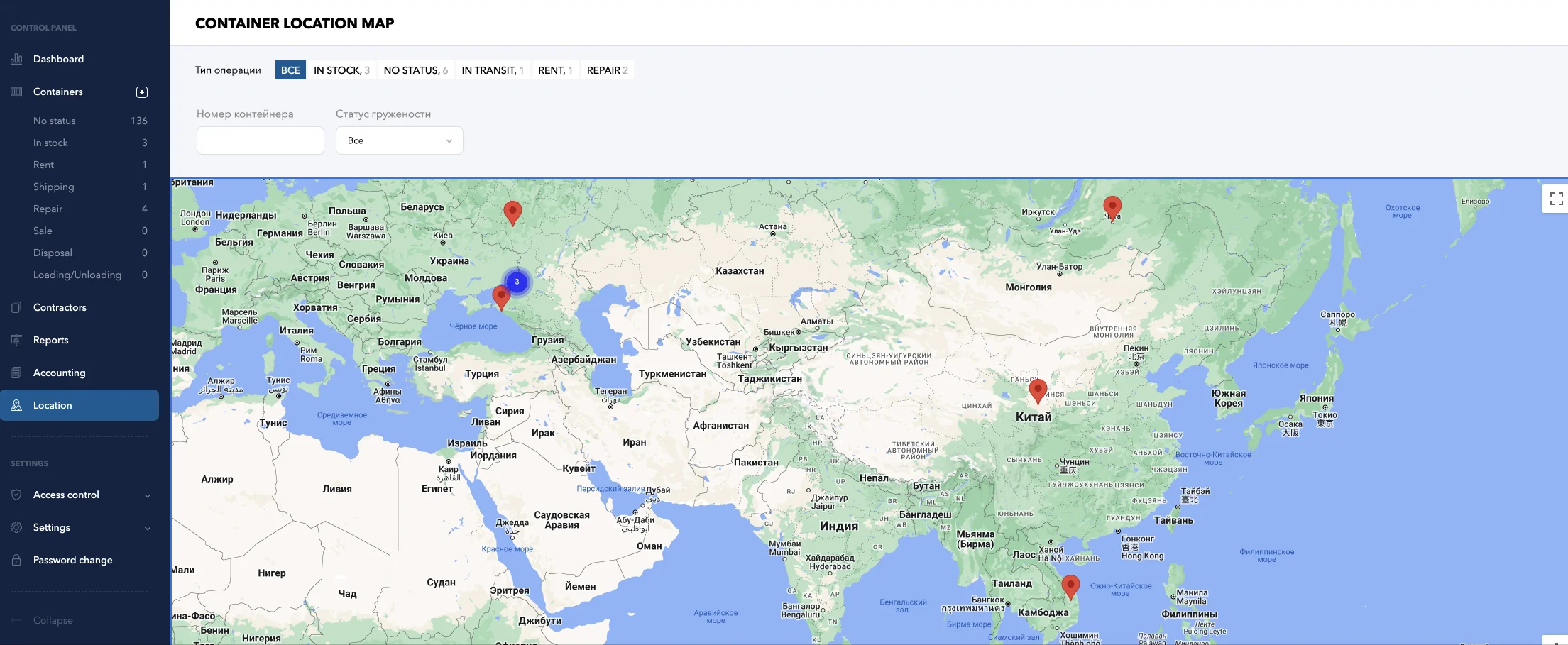
Geopositioning map
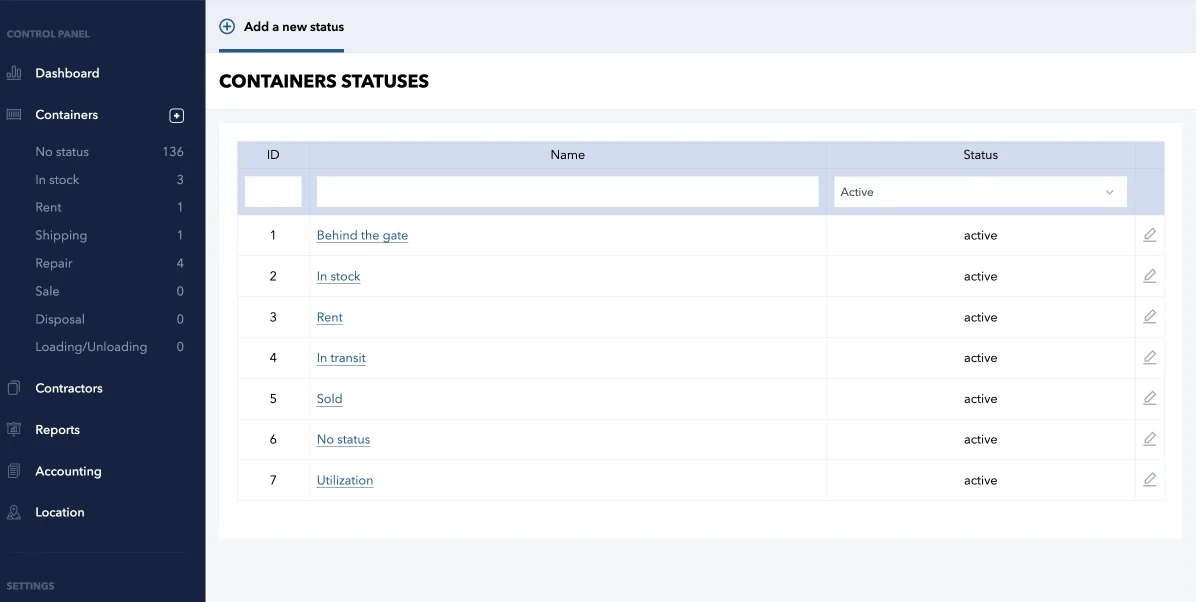
Container Status Directory
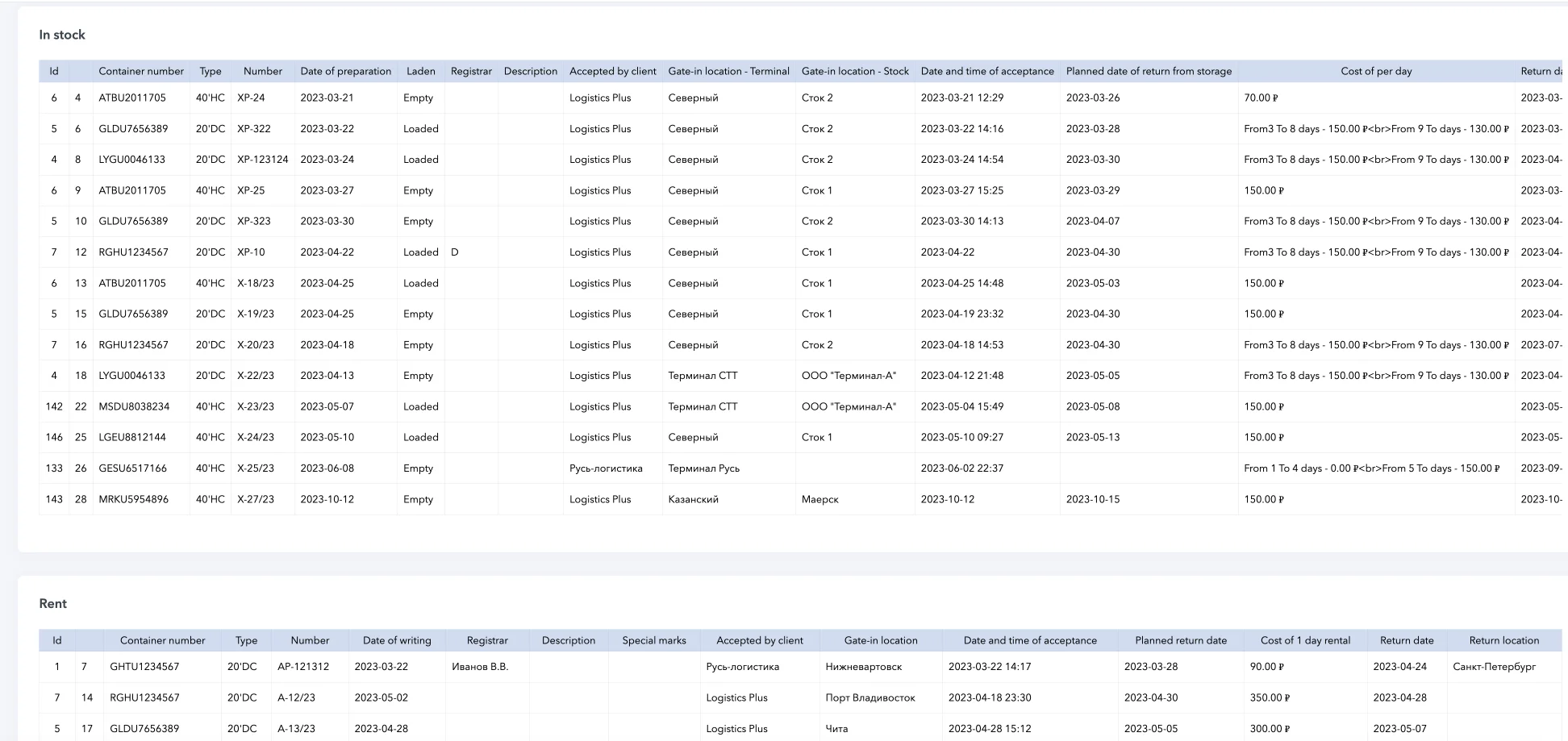
Detailed reporting on each container and event with uploading to DOC, PDF, XLS
LogPark — Container Management Software Features
- Full registry: empty/loaded, tanks, reefers, trailers, flatracks
- 20′ and 40′ containers with TEU auto-calculation
- 9 session types for complete lifecycle coverage
- Complete operation history per container
- Container transfer tracking between terminals
- Transport guide generation and bills of lading
- Origin-destination route recording per session
- Automatic status transition on dispatch/arrival

- Automated container rental billing with configurable tariffs
- Multi-dimensional pricing: type × laden × size
- Free-day thresholds and grace period calculation
- Invoice generation with settlement tracking
- Real-time container tracking on interactive map
- Terminal → Stock hierarchical location model
- Movement history and geo-positioning
- Multi-site depot availability management

- Fleet reports by status, type, contractor, dates
- Export to Excel (XLSX), PDF, and DOC
- Custom column selection and multi-field sorting
- Financial reports: invoices, payments, balances

- Real-time dashboard: 10+ metric cards (20’/40′)
- Highcharts graphs for 90-day trend analysis
- TEU auto-calculation across entire fleet
- Automated billing reduces operational costs

- Roles: Admin, Manager, Staff, Client, Accountant
- Granular permissions per module (CRUD)
- Customer personal accounts with scoped visibility
- Complete audit trail — every change logged
- Repair management with parallel session support
- Defect descriptions, cost tracking, reports
- Leased container monitoring: return dates, alerts
- Storage accounting across depot sites and cells

- Browser-based SaaS — works on any device
- 6 languages: EN, DE, ES, ZH, TR, RU
- Dynamic custom fields — extend without code
- Contractor management with terminals and contracts
Why LogPark for Container Inventory Management?
Built for Container Leasing and Rental Operations
Unlike generic ERP or warehouse systems, LogPark is purpose-built for the container logistics industry. The container rental software handles the full rental lifecycle — from rate negotiation to final invoice generation.
Container rental billing systems are integrated into every session type. Storage fees, transport charges, and repair costs are automatically tracked against the correct contractor and contract.
What This Means for Fleet Operators
- No more spreadsheet reconciliation — every charge is calculated automatically
- Real-time financial reports across all locations
- Free-day management with configurable grace periods
- Container rental optimization tools reduce revenue leakage
Container Asset Management and Depot Operations
For container depot management, LogPark offers a complete operational backbone. The Contractor module manages your full partner ecosystem — customers, shipping lines, transport companies — with linked terminals and service contracts.
The container handling software tracks gate-in/gate-out with detailed condition recording. Parallel repair sessions ensure M&R work doesn’t block other operations on the same unit.
Automatic Status Transitions
Every container status transition is automatic:
- Storage session opens → container moves to “In Storage”
- Storage closes + Rent begins → shifts to “In Rent”
- Repair session opens → “Under Repair” flag without blocking other sessions
- No manual updates needed — human error is eliminated
This container depot software approach keeps your inventory database accurate at all times.
Sıkça Sorulan Sorular — Konteyner Envanter Yönetimi
Konteyner envanter yönetimi yazılımı, filonuzdaki her nakliye konteynerinin konumunu, durumunu, kira sözleşmelerini, onarım geçmişini ve finansal işlemlerini takip eden özel bir platformdur. LogPark bunu, girişten imhaya kadar tüm konteyner yaşam döngüsünü kapsayan 9 yerleşik oturum türü aracılığıyla sağlar.
LogPark, sözleşmeye bağlı tarifeler aracılığıyla kira faturalandırmasını otomatikleştirir. Bir kiralama seansı oluşturulduğunda sistem konteyner boyutuna, dolu/boş durumuna, servis yönüne ve serbest gün eşiklerine göre doğru oranları uygular. Faturalar, tam ödeme takibi ile otomatik olarak oluşturulur.
Evet. LogPark, her konteyneri mevcut konumuna eşleyen hiyerarşik bir konum modeli (Yüklenici → Terminal → Stok) kullanır. Entegre harita modülü, tüm depo tesislerinizde ve transit rotalarınızda gerçek zamanlı görünürlük sağlar.
LogPark tüm standart konteyner türlerini destekler: 20′ ve 40′ kuru konteynerler, high-cube, soğutuculu (soğutmalı), tank konteynerler, düz paletli konteynerler, üstü açık, römorklar ve araçlar. Referans modülü, gerektiği gibi özel türleri ve boyutları tanımlamanıza olanak tanır.
Evet. LogPark, kutudan çıktığı haliyle 6 dili desteklemektedir: İngilizce, Almanca, İspanyolca, Çince, Türkçe ve Rusça. Arayüz kullanıcı başına değişir ve bu da onu çok uluslu lojistik ekipleri için uygun hale getirir.
Onarım (M&R) modülü paralel onarım oturumlarına izin verir; bir konteyner aynı anda depodayken onarım altında da olabilir. Her onarım oturumu kusur açıklamalarını, maliyet tahminlerini ve tamamlanma durumunu izler. Bu, onarım çalışmalarının aynı ünitedeki diğer işlemleri engellemesini önler.
Evet. Dinamik Alan Sistemi, yöneticilerin herhangi bir kod değişikliği yapmadan oturum türü başına sınırsız özel veri alanları oluşturmasına olanak tanır. Bölgesel gereksinimler, özel kapsayıcı özellikleri veya benzersiz iş süreçleri için alanlar ekleyebilirsiniz.
LogPark Entegrasyonu Örnek Olay İncelemesi:
| Endüstri | Konteyner kiralama ve lojistik şirketi |
| Filo Büyüklüğü | ~3.500 TEU (20′ ve 40′ konteynerler) |
| Konteyner Çeşitleri | Kuru, soğutmalı, tanklı, üstü açık |
| Operasyonlar | Depolama, kiralama, onarım (M&R), transferler |
| Konumlar | Çok sahalı depo operasyonları |
LogPark Uygulamasından Önce ve Sonra:
| Önce | LogPark’tan sonra | |
|---|---|---|
| Yazılım | Excel elektronik tabloları, kağıt belgeler | Bulut tabanlı SaaS — her cihazdan, her yerden erişilebilir |
| Konteyner Takibi | Manuel kayıtlar, kullanılabilirliği kontrol etmek için telefon görüşmeleri | Konteyner başına durum, konum ve tam operasyon geçmişiyle gerçek zamanlı filo genel görünümü |
| Faturalandırma | Depolama günlerinin manuel olarak hesaplanması — fatura başına 1-3 gün sürdü | Serbest gün hesaplaması ve Excel’e aktarma ile yapılandırılmış tarife oranlarında otomatik faturalandırma |
| Raporlama | Excel’de manuel oluşturma, günlük e-posta raporları | PDF, Excel ve DOC dışa aktarımıyla site başına otomatik rapor oluşturma |
| Müşteri Erişimi | Yalnızca e-posta ve telefon | Kapsamlı görünürlük, entegre mesajlaşma ve elektronik kapı isteklerine sahip kişisel hesaplar |
| Onarım Takibi | Ayrı günlükler, konteyner kayıtlarıyla bağlantı yok | Maliyet takibi ve kusur kaydı ile kapsayıcılara bağlı paralel M&R oturumları |
|
İlköğretim
|
Üs
|
Gelişmiş
|
|
|---|---|---|---|
| Tarifeler | |||
| Sahadaki konteyner kaydı. Boş, yüklü, soğutmalı. | |||
| Müşterinin kişisel hesabı üzerinden giriş/çıkış için elektronik talepler. | |||
| Giriş/çıkış sertifikasında tank kusurlarının açıklaması. | |||
| Belirli bir konteynere giriş/çıkış yaparken tarama ekleme. | |||
| Konteynerler hakkındaki bilgilerin değişiklik/düzenleme geçmişi. | |||
| Küresel tank hatları (Maersk, CMA-CGM, vb.) ile EDI veri alışverişi Konteynerlerin alınması, gönderilmesi, onarım durumu hakkında. | |||
| Veritabanınızı içe aktarma (Excel, XML, CSV) | |||
| ERP entegrasyonu | |||
| Deneme süresi |  |
|
|
| Sunucu alanı | 10 Gb | 30 Gb | 50 Gb |
| Aylık fiyat | TEU başına 0,8’den | İstek üzerine | İstek üzerine |