


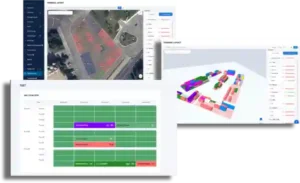

Plan the Entire Terminal on a Live 2D Map
Contpark’s Container Terminal Layout Planning Software gives operators a visual model of the yard, depot, and warehouse on top of a real satellite map. Zones, storage sections, and actual container placement stay connected in one operational workspace.
Instead of maintaining separate drawings, spreadsheets, and verbal instructions, terminal teams work with one live layout that reflects the actual storage logic of the site.
What is modeled in 2D
- Terminal zones with color, dimensions, coordinates, and rotation angle
- Sections linked to rows, positions, and tiers
- Satellite context for roads, gates, buildings, and stacking areas
- Fast creation of new zones and sections directly from the map editor
Switch from 2D to 3D Without Leaving the Page
The built-in 3D mode turns the same terminal geometry into an operational digital twin. Users can move from planning to spatial validation instantly, without opening a separate system or rebuilding the layout in another tool.
Because the 3D scene uses the same coordinates, dimensions, and orientation as the 2D map, supervisors can verify section placement, stacking logic, and container visibility in seconds.
3D mode capabilities
- Real section geometry based on actual size and coordinates
- Container rendering by row, slot, and tier
- Search by container number with camera focus on the exact unit
- Scene alignment with the current 2D center and zoom level

Build Storage Sections Fast and Edit Them In Place
The module is designed for daily operational editing, not just one-time planning. Teams can create a section, generate a storage grid, place it on the map, move it with drag-and-drop, rotate it, recolor it, and save changes automatically.
Sections stay grouped by zone in the side panel, so dispatchers and planners can navigate large terminals without losing structure or context.
Editing workflow in one interface
- Create or remove section placement without deleting the section entity itself
- Open context actions with right click
- Autosave position, angle, and color changes
- Select a section from the list and highlight it in both 2D and 3D

See Capacity, Occupancy, and Container Position in Real Time
CTLP is not just a drawing tool. It helps operations teams understand how much space is available, where containers are actually stored, and which zones are approaching saturation.
Zone-level capacity metrics, live container visualization, and timed refreshes make the layout useful for daily planning, exception handling, and customer-facing terminal visibility.
Operational visibility layer
- Total, occupied, and free capacity by zone
- Occupancy percentage for faster space balancing
- 3D container attributes: number, type, size, laden or empty, reefer, color
- Manual refresh and automatic timed refresh for container positions
Key features
- View the terminal on a real map background
- Search places and addresses with Google Maps inside the editor
- Keep layout decisions aligned with the physical site
- Move between operational map and 3D scene in one module
- Use the same coordinates and geometry in both views
- Validate layout choices visually before field execution
- Create zones directly from the map interface
- Define section color, size, position, and angle
- Group sections by zone in the side panel

- Generate rows, positions, and tiers quickly
- Place sections on the map with the correct orientation
- Remove map placement without deleting the logical section
- Track total capacity, occupied slots, and free space
- See percentage fill levels for each zone
- Improve balancing across the entire yard

- Move sections with drag and drop
- Rotate and recolor sections in place
- Autosave geometry and style changes automatically

- Render containers in their actual cells and tiers
- Display number, type, size, status, reefer flag, and color
- Open the container card directly from the 3D scene

- Find a container by number in 3D
- Focus the camera on the exact match
- Use manual or timed refresh for container positions

- Enable or disable 3D mode by configuration
- Set base coordinates, scene scale, and detail level
- Control buildings, water, grid, provider, and theme behavior
How CTLP supports daily terminal operations

Reduce planning friction for supervisors and dispatchers
When the terminal map, section geometry, and current occupancy live in one place, teams make faster planning decisions. They can see whether a new import stack fits in the intended area, whether reefer capacity is balanced, and which zones are best suited for shifting demand.
Typical planning scenarios
- Reconfigure a zone for a new service or customer contract
- Add overflow sections before peak vessel windows
- Check whether container mix matches available slot geometry
- Present a clear storage map to operations, sales, and customers
Bridge planning data with live operational reality
Many terminals plan in static drawings but operate in a different reality once the yard starts moving. CTLP closes that gap by showing real containers in the layout itself, not in a disconnected report.
Why this matters operationally
- Fewer mismatches between planned and actual placement
- Faster incident investigation when a unit cannot be found visually
- Better use of terminal land through live occupancy insight
- Clearer communication between control room, yard teams, and management
Frequently Asked Questions - Container Terminal Layout Planning
Container terminal layout planning software is a visual planning and execution tool that models the terminal on a live map, organizes zones and storage sections, and shows how containers are placed across the yard. In Contpark, the same layout can also be viewed in 3D for faster spatial validation.
Yes. The layout module supports direct switching between 2D and 3D modes inside the same workflow. Both views use the same coordinates, section geometry, and placement logic, so users do not need to rebuild the layout in another tool.
Operators can create zones directly on the map, create sections with rows, positions, and tiers, place them visually, move them with drag-and-drop, rotate them, change their color, and autosave all geometry changes. Sections remain grouped by zone in the side panel for easier navigation.
Yes. In 3D mode the system can render containers by their actual rows, slots, and tiers. Users can see the container number, type, size, laden or empty status, reefer flag, and color, then open the container card directly from the 3D view.
Yes. Users can search by container number, highlight the result, and focus the 3D camera on the matching unit. This is useful for dispatchers, supervisors, and customer support teams when they need to validate location quickly.
The module calculates occupancy by zone, including total capacity, occupied space, free capacity, and fill percentage. This gives planners a live view of available storage and helps them rebalance the yard before bottlenecks appear.
Yes. Administrators can enable or disable 3D mode, set base coordinates, choose detail level and scene scale, configure buildings, water, and grid visibility, and select the preferred 3D provider. This makes the scene easier to adapt to different terminals and hardware profiles.
Container Terminal Layout Planning - Implementation Snapshot
| Industry | Container terminals, inland depots, empty depots, and warehouse-enabled yards |
| Main use case | Visual planning of zones and sections with synchronized 2D and 3D operational visibility |
| Core data layers | Zones, sections, rows, positions, tiers, live container placement, occupancy by zone |
| User groups | Terminal managers, yard planners, dispatchers, supervisors, and customer-facing teams |
| Editing tools | Create, place, move, rotate, recolor, highlight, and autosave sections directly on the map |
| Operational result | Faster planning decisions, better yard visibility, fewer placement errors, and clearer capacity control |
Container Terminal Layout Planning - Before and After Digital Visualization
Reefer Monitoring System Implementation – Before & After Optimization
| Before Implementation | After Implementation |
|---|---|
| Manual temperature checks leading to delays and human errors | Real-time automated temperature tracking with instant alerts |
| No centralized reefer monitoring system | Integrated system with remote access and control |
| High energy consumption without optimization | Energy usage tracking and efficiency reports |
| Limited visibility on reefer performance and conditions | Data-driven insights and analytics for proactive decision-making |
| Reactive maintenance after breakdowns | Predictive maintenance alerts to prevent failures |
| No integration with other logistics or ERP systems | Seamless integration with EDI, API, and TOS |
| Time-consuming manual reporting | Automated reports in DOC/XLS/PDF formats |
| Capability | Manual maps / CAD files | Contpark CTLP |
| 2D yard view | Static drawing or screenshot | Interactive satellite-based terminal map |
| 3D validation | Separate tool or no 3D at all | Built-in 3D mode with synchronized geometry |
| Section creation | Manual drafting and separate documentation | Create sections with rows, slots, and tiers from the editor |
| Section editing | Move and rotate outside the operations workflow | Drag-and-drop, rotate, recolor, and autosave in place |
| Occupancy control | Calculated manually or from separate reports | Live total, occupied, free, and fill percentage by zone |
| Container location in layout | Usually missing from the planning layer | Rendered in 3D by actual cell, row, and tier |
| Search and navigation | Manual lookup across files and reports | Container search with direct 3D camera focus |
| 3D environment control | No operational scene settings | Provider, detail, scale, buildings, water, grid, and theme settings |